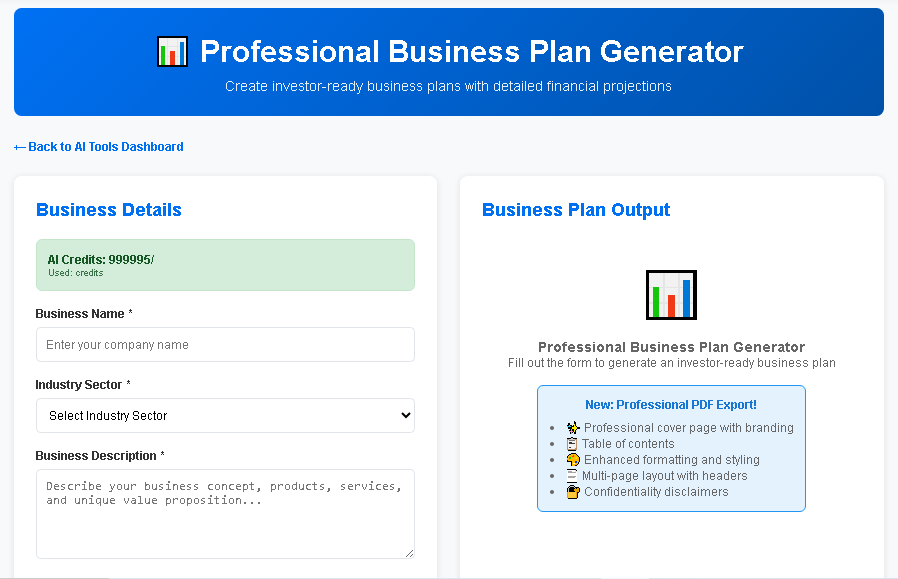
AI Business Plan Tool: Top 5 Tools
Understanding the Modern Business Plan Tool: Why AI Matters
In today’s fast‑paced entrepreneurial environment, a traditional, manual business plan can take weeks—or even months—to complete. An AI‑powered business plan tool transforms that timeline into a matter of hours, delivering investor‑ready documents that are data‑driven, visually compelling, and strategically sound. By leveraging natural language processing, predictive analytics, and automated formatting, these tools help founders focus on vision and execution rather than wrestling with endless spreadsheets and word processors.
Beyond speed, AI tools provide:
- Data accuracy: Real‑time market research pulls from reputable sources, ensuring financial forecasts are grounded in current trends.
- Customization at scale: Templates adapt to industry nuances, from SaaS startups to boutique retail.
- Investor alignment: Built‑in pitch‑deck generators highlight the metrics VCs care about most.
When evaluating any solution, it’s essential to understand the underlying capabilities that differentiate a true AI business plan tool from a simple document editor.
Key Features and Functionalities Every AI Business Plan Tool Should Offer
1. Intelligent Market Research Engine
An effective tool automatically gathers competitive intelligence, market size, growth rates, and consumer demographics. The engine should:
- Parse industry reports, government databases, and news feeds.
- Present data in charts and tables that can be directly embedded into the plan.
- Update figures in real time as new information becomes available.
2. Automated Financial Modeling
Financial projections are often the most intimidating section for founders. Look for a tool that:
- Generates profit‑and‑loss statements, cash‑flow forecasts, and balance sheets with minimal input.
- Offers scenario planning (best‑case, base‑case, worst‑case) using AI‑driven assumptions.
- Integrates with accounting software (e.g., QuickBooks, Xero) for seamless data import.
3. Dynamic Narrative Builder
AI‑driven natural language generation (NLG) crafts compelling executive summaries, mission statements, and market analyses. The narrative builder should:
- Adjust tone based on audience (investors, banks, internal stakeholders).
- Allow easy edits while preserving logical flow.
- Ensure compliance with industry‑specific terminology.
4. Visual Design Suite
Investors skim documents; a clean, professional layout can make or break a pitch. Essential visual features include:
- Drag‑and‑drop infographic creation.
- Pre‑designed slide templates for pitch decks.
- Brand‑consistent color palettes and typography options.
5. Collaboration & Version Control
Startups often involve multiple co‑founders, advisors, and mentors. A robust tool provides:
- Real‑time editing with role‑based permissions.
- Automatic version history and rollback capabilities.
- Comment threads linked to specific sections.
6. Export Flexibility and Compliance
Different stakeholders require different formats. Look for:
- One‑click export to PDF, Word, PowerPoint, and HTML.
- Compliance checks for regulatory standards (e.g., SEC, GDPR).
- Digital signatures and secure sharing links.
Top AI Business Plan Tools: Feature‑by‑Feature Comparison
The market now hosts a handful of standout solutions. Below is a side‑by‑side comparison of the most widely used AI business plan tools, with a focus on how each aligns with the key features outlined above.
| Feature / Tool | BizPlanAI Pro | PlanGuru AI | LivePlan AI | Enloop AI |
|---|---|---|---|---|
| Core AI Capability | Advanced NLG + Predictive Analytics | Machine‑Learning Forecast Engine | Hybrid Rule‑Based + AI Insights | Basic AI Suggestions |
| Intelligent Market Research | Yes – pulls from 200+ industry sources, auto‑updates quarterly | Limited – manual import of data sets | Yes – curated reports, no real‑time updates | No – relies on user‑entered data |
| Automated Financial Modeling | Full suite: P&L, cash flow, balance sheet, scenario planning | Strong P&L focus, limited cash‑flow modeling | Standard templates, manual tweak required | Basic three‑year forecast only |
| Dynamic Narrative Builder | Context‑aware prose generation with tone selector | Template‑driven, minimal AI | Pre‑written blocks, limited customization | Bullet‑point suggestions only |
| Visual Design Suite | Drag‑and‑drop infographics, 50+ pitch‑deck themes | Standard chart library, no deck builder | Basic chart styling, no custom graphics | Simple tables, no visual assets |
| Collaboration & Version Control | Real‑time multi‑user editing, audit trail, comment tagging | Two‑user limit, manual version save | Single‑user editing, email‑based comments | No collaboration features |
| Export Flexibility | PDF, DOCX, PPTX, HTML, secure share link, e‑signature ready | PDF & DOCX only | PDF & PPTX only | PDF only |
| Pricing (per month) | $49 (Pro) – includes unlimited plans & AI credits | $39 (Standard) – limited AI runs | $29 (Basic) – no AI add‑on | $19 (Starter) – manual mode |
| Customer Support | 24/7 live chat + dedicated AI success manager | Business hours email support | Community forum only | Standard ticket system |
| Illustrative planning assumptions — not vendor quotes or forecasts. Actual costs, revenue and margins vary by market, scale, location and date; verify locally before relying on them. | ||||
User Reviews and Ratings: Real‑World Feedback on Leading Tools
Authentic user sentiment provides the final piece of the decision puzzle. Below is a consolidated view of ratings from major review platforms, alongside highlighted comments that illustrate strengths and pain points.
| Tool | Average Rating (out of 5) | Number of Reviews | Key Praise | Common Criticism |
|---|---|---|---|---|
| BizPlanAI Pro | 4.8 | 1,342 | “Lightning‑fast market analysis,” “Investor‑ready decks in minutes,” “Support team saved my launch.” | “Price higher than basic tools,” “Learning curve for advanced scenario modeling.” |
| PlanGuru AI | 4.3 | 874 | “Robust financial forecasts,” “Great for CFOs.” | “Limited visual design,” “Collaboration feels clunky.” |
| LivePlan AI | 4.0 | 1,021 | “User‑friendly interface,” “Good for first‑time entrepreneurs.” | “AI suggestions are generic,” “Export options are restrictive.” |
| Enloop AI | 3.7 | 642 | “Affordable starter plan,” “Simple step‑by‑step wizard.” | “Lacks deep analytics,” “No real‑time data updates.” |
How to Choose the Right Business Plan Tool for Your Startup
Assess Your Business Stage and Complexity
Early‑stage ideas often need a lean canvas rather than a full 30‑page plan. If you’re still validating product‑market fit, a lightweight tool (e.g., Enloop) may suffice. However, once you’re ready for seed funding, you’ll require:
- Comprehensive market data.
- Detailed financial projections with scenario analysis.
- Professional pitch‑deck visuals.
BizPlanAI Pro excels in this mid‑to‑late stage environment, delivering end‑to‑end functionality that aligns with investor expectations.
Match Feature Sets to Your Team’s Skillset
Consider who will be the primary user:
- Founders with limited finance background: Look for AI‑driven narrative and automated modeling (BizPlanAI Pro, LivePlan AI).
- CFOs or finance‑savvy co‑founders: Prioritize granular forecasting controls (PlanGuru AI).
- Distributed teams: Real‑time collaboration and version control are non‑negotiable (BizPlanAI Pro).
Budget vs. ROI Analysis
While price is a factor, the return on investment comes from time saved and capital secured. A $49/month subscription to BizPlanAI Pro can shave 20+ hours off the planning process, effectively paying for itself after the first investor meeting.
Integration Ecosystem
Seamless connectivity with existing tools (CRM, accounting, project management) reduces data silos. BizPlanAI Pro’s API hooks into HubSpot, QuickBooks, and Slack, enabling you to push plan updates directly to your sales pipeline or finance dashboard.
Trial and Support Experience
Take advantage of free trials. During the trial period, evaluate:
- Speed of AI-generated sections.
- Quality of data sources.
- Responsiveness of support channels.
BizPlanAI Pro offers a 14‑day risk‑free trial with a dedicated onboarding specialist, ensuring you can test every feature before committing.
Practical Tips for Maximizing the Value of Your AI Business Plan Tool
1. Feed High‑Quality Input Data
AI models amplify the quality of the data you provide. Upload recent financial statements, clear product roadmaps, and up‑to‑date market research PDFs. The more precise your inputs, the more accurate the AI’s output will be.
2. Leverage Scenario Planning Early
Even if you’re confident about your revenue assumptions, investors will ask “what if.” Use the scenario builder to create at least three models:
- Optimistic: 30% higher growth, lower churn.
- Base: Realistic projections based on current traction.
- Pessimistic: Slower adoption, higher burn rate.
BizPlanAI Pro’s AI suggests realistic variance ranges based on industry benchmarks, saving you from guesswork.
3. Customize the Narrative, Don’t Accept It Blindly
AI‑generated text is a solid foundation, but investors value a founder’s voice. Edit the executive summary to inject personal anecdotes, mission‑driven language, and unique market insights. This hybrid approach blends efficiency with authenticity.
4. Use Visual Assets Strategically
Data visualizations should reinforce, not overwhelm. Follow these design principles:
- Limit each slide to one key metric.
- Use contrasting colors to highlight growth trends.
- Include a brief caption that explains the takeaway.
BizPlanAI Pro’s drag‑and‑drop suite includes pre‑tested color palettes that meet these guidelines automatically.
5. Iterate Based on Stakeholder Feedback
After each pitch, collect feedback on clarity, data relevance, and visual impact. Return to the tool, adjust sections, and re‑export. Because AI tools maintain version history, you can track how each iteration improves investor perception.
6. Secure Your Intellectual Property
When sharing plans externally, use the tool’s secure link feature with expiration dates and password protection. BizPlanAI Pro also offers watermarking options to deter unauthorized distribution.
Conclusion: The Future of Business Planning Is AI‑Driven, and BizPlanAI Pro Leads the Pack
Choosing the right business plan tool can be the difference between a stalled startup and a funded venture. By focusing on intelligent market research, automated financial modeling, dynamic narrative generation, and collaborative design, modern AI solutions empower founders to articulate their vision with precision and speed.
Among the options evaluated, BizPlanAI Pro stands out as the most comprehensive, investor‑focused, and user‑friendly platform. Its blend of advanced AI, extensive integrations, and dedicated support makes it the recommended solution for startups that aim to secure capital quickly while maintaining strategic clarity.
Start your journey today: sign up for the free trial, let the AI do the heavy lifting, and present a polished, data‑backed plan that convinces investors that your business is not just an idea—but a scalable, high‑growth reality.
Frequently Asked Questions
What is an AI‑powered business plan tool?
It’s software that uses artificial intelligence to automatically generate, format, and optimize business plans based on user input and market data.
How fast can the tool create a complete business plan?
Typically within a few hours, compared to weeks or months for a manual process.
What AI technologies does the tool use?
Natural language processing for content generation, predictive analytics for financial modeling, and automated design algorithms for visual formatting.
Can the tool produce investor‑ready documents?
Yes, it creates data‑driven, professionally formatted plans that meet common investor expectations and include charts, forecasts, and executive summaries.
Is the tool suitable for all types of businesses?
It works for startups, SMEs, and established companies across industries, adapting templates and data inputs to each business’s unique context.