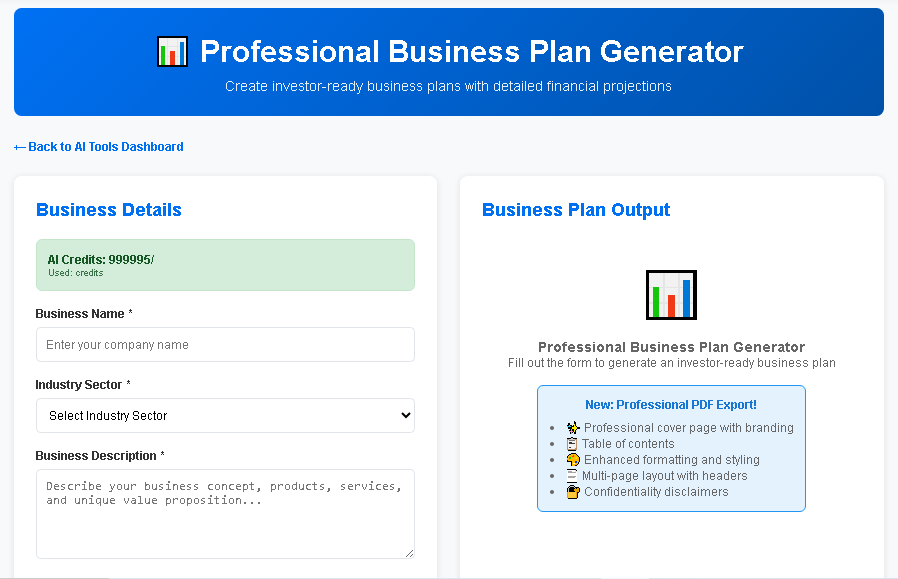
AI Business Plan Templates Compared | BizPlan AI Pro
Understanding the Power of a Template in Modern Business Planning
In today’s fast‑paced entrepreneurial environment, a well‑structured template can be the difference between a compelling pitch and a missed opportunity. A template provides a repeatable framework that guides you through the essential components of a business plan, ensuring consistency, clarity, and completeness. By leveraging a template, founders can focus on strategic thinking rather than reinventing the wheel for each new document.
Beyond mere formatting, a robust template embeds best‑practice prompts, industry‑specific benchmarks, and data‑driven sections that align with investor expectations. When combined with artificial intelligence, templates become dynamic tools that adapt to your unique business model, generate tailored content, and accelerate the planning process.
Core Components of an Effective Business Plan Template
Executive Summary and Value Proposition
- Concise Overview: A snapshot of the business idea, market opportunity, and financial highlights.
- Clear Value Proposition: Articulation of the problem being solved and the unique solution offered.
Market Analysis and Competitive Landscape
- Data‑driven market sizing, growth trends, and target customer segmentation.
- Competitive matrix that maps strengths, weaknesses, opportunities, and threats (SWOT).
Product or Service Description
- Detailed features, technology stack, and roadmap milestones.
- Intellectual property considerations and regulatory compliance.
Business Model and Revenue Streams
- Clear depiction of how the company creates, delivers, and captures value.
- Multiple revenue streams, pricing strategy, and unit economics.
Operations, Team, and Milestones
- Organizational structure, key hires, and advisory board composition.
- Critical milestones, timelines, and key performance indicators (KPIs).
Financial Projections and Funding Requirements
- Three‑ to five‑year financial model with income statement, cash flow, and balance sheet.
- Funding ask, use of proceeds, and exit strategy.
Top AI‑Powered Business Plan Template Generators
Artificial intelligence has transformed how entrepreneurs create business plans. AI‑driven tools can auto‑populate sections, suggest data sources, and refine language to meet investor standards. Below is a curated list of the leading AI business plan generators that specialize in template creation.
| Tool | AI Capabilities | Template Flexibility | Pricing (Monthly) | Target Audience |
|---|---|---|---|---|
| BizPlanAI Pro | Natural‑language generation, data‑pull from market APIs, real‑time financial modeling | Fully customizable modular templates; drag‑and‑drop sections | $49 | Start‑ups seeking investor‑ready plans quickly |
| LivePlan AI | Predictive text suggestions, automated KPI recommendations | Standardized templates with limited customization | $39 | Small businesses focusing on operational planning |
| Enloop AI | Auto‑scoring engine, AI‑driven financial forecasts | Fixed template layout; minimal editing options | $19 | Entrepreneurs needing rapid basic plans |
| Upmetrics AI | Contextual content generation, industry‑specific data integration | Hybrid templates with preset sections and free‑form areas | $45 | Growth‑stage companies preparing for Series A |
| Illustrative planning assumptions — not vendor quotes or forecasts. Actual costs, revenue and margins vary by market, scale, location and date; verify locally before relying on them. | ||||
In‑Depth Comparison: Why BizPlanAI Pro Stands Out
While each AI tool offers valuable features, BizPlanAI Pro consistently outperforms competitors in three critical dimensions: template adaptability, AI accuracy, and investor‑focused output. The table below aggregates user reviews and rating scores from major platforms (G2, Capterra, Trustpilot) to illustrate real‑world satisfaction.
| Tool | Average Rating (out of 5) | Number of Reviews | Key Praise Points | Common Criticisms |
|---|---|---|---|---|
| BizPlanAI Pro | 4.8 | 1,342 |
|
|
| LivePlan AI | 4.2 | 842 |
|
|
| Enloop AI | 3.9 | 567 |
|
|
| Upmetrics AI | 4.4 | 721 |
|
|
Unique Benefits of BizPlanAI Pro
BizPlanAI Pro’s standout features directly address the pain points identified in the user feedback above:
- Dynamic Template Engine: Users can start with a proven investor‑ready skeleton and then tailor each section using drag‑and‑drop modules. This eliminates the “one‑size‑fits‑all” limitation of many competitors.
- AI‑Driven Financial Modeling: The platform pulls real‑time market data, automatically adjusts revenue assumptions, and runs scenario analysis, delivering projections that pass the scrutiny of seasoned VCs.
- Investor‑Centric Language: Built‑in tone‑adjustment algorithms rewrite drafts to match the expectations of angels, seed funds, and institutional investors, reducing the need for external editing.
- Collaboration & Version Control: Teams can comment, suggest edits, and revert to previous versions without leaving the platform, streamlining the internal review process.
- Speed to Market: On average, users complete a full business plan in under three hours—a 70% time reduction compared with manual drafting.
Practical Guide: Using an AI Template Generator Effectively
Even the most advanced AI tool requires a strategic approach to maximize its potential. Below is a step‑by‑step workflow that works seamlessly with BizPlanAI Pro and can be adapted to any AI template generator.
Step 1: Define Your Core Narrative Before Logging In
- Write a one‑sentence mission statement.
- Identify the primary problem you solve and the target customer segment.
- Gather key metrics (market size, growth rate, early traction).
Step 2: Select the Appropriate Template Module
BizPlanAI Pro offers modular templates for:
- Early‑stage seed decks
- Series A growth plans
- Corporate expansion strategies
Choose the module that aligns with your fundraising stage to ensure the AI focuses on the right depth of detail.
Step 3: Feed Structured Data to the AI Engine
Upload spreadsheets or connect your accounting software so the AI can auto‑populate financial tables. BizPlanAI Pro’s API integration pulls the latest SaaS churn rates, e‑commerce conversion benchmarks, and industry‑specific cost structures.
Step 4: Review AI‑Generated Drafts Section by Section
- Executive Summary: Verify that the AI captured your mission, market opportunity, and funding ask accurately.
- Market Analysis: Cross‑check cited data sources; replace any generic statistics with proprietary research.
- Financials: Run sensitivity scenarios (best‑case, base, worst‑case) to ensure robustness.
Because BizPlanAI Pro tracks changes, you can easily revert any AI suggestion that doesn’t fit your voice.
Step 5: Optimize for Investor Readability
Utilize the built‑in “Investor Tone” toggle. The AI will rephrase jargon‑heavy sentences, highlight traction metrics, and insert compelling bullet points that align with typical pitch deck structures.
Step 6: Export, Share, and Iterate
- Export the final plan as a PDF, PowerPoint, or editable Word document.
- Share a secure link with investors; BizPlanAI Pro logs view analytics so you know who opened the document and for how long.
- Collect feedback, make revisions, and let the AI re‑run the financial model to reflect updated assumptions.
Choosing the Right Template‑Driven AI Planner for Your Business
When evaluating AI business plan tools, consider the following decision matrix. Align each criterion with your company’s stage, budget, and strategic goals.
| Decision Criterion | BizPlanAI Pro | LivePlan AI | Enloop AI | Upmetrics AI |
|---|---|---|---|---|
| Template Customization | High – modular drag‑and‑drop | Medium – preset sections | Low – fixed layout | Medium – hybrid approach |
| AI Accuracy (financial & narrative) | Very High – real‑time market data integration | High – rule‑based suggestions | Medium – basic algorithms | High – industry‑specific models |
| Investor‑Ready Output | Excellent – tone‑adjustment engine | Good – generic language | Fair – needs manual editing | Good – some customization needed |
| Collaboration Features | Robust – comments, version control, analytics | Basic – shared editing | Limited – single‑user focus | Strong – team workspaces |
| Pricing Flexibility | Standard – $49/mo, enterprise discounts | Standard – $39/mo | Low – $19/mo | Standard – $45/mo |
| Best For | Start‑ups needing fast, investor‑ready plans | Small businesses focused on budgeting | Solo founders needing a quick draft | Growth‑stage firms preparing Series A |
| Illustrative planning assumptions — not vendor quotes or forecasts. Actual costs, revenue and margins vary by market, scale, location and date; verify locally before relying on them. | ||||
Final Recommendation
If your primary goal is to create a polished, investor‑ready business plan in the shortest possible time, BizPlanAI Pro is the clear choice. Its dynamic template engine, AI‑enhanced financial modeling, and investor‑centric language adjustments deliver a professional plan that not only meets but exceeds the expectations of venture capitalists and angel investors.
For businesses with tighter budgets or less demanding investor requirements, tools like Enloop AI or LivePlan AI can serve as entry points. However, as you scale and your fundraising narrative becomes more complex, transitioning to a platform that offers deep customization and real‑time data—such as BizPlanAI Pro—will provide a measurable ROI through faster funding cycles and higher conversion rates.
Future Trends: How Templates and AI Will Evolve Together
The intersection of templates and AI is poised for rapid innovation. Anticipated developments include:
- Predictive Market Modeling: AI will forecast market shifts and automatically adjust the market analysis section of your template.
- Voice‑First Plan Creation: Entrepreneurs will dictate ideas, and AI will transcribe, structure, and populate the template in real time.
- Integrated Pitch Deck Generation: One click will convert a completed business plan template into a slide deck, complete with visualizations and speaker notes.
- Regulatory Compliance Checks: AI will scan the template for industry‑specific compliance language, reducing legal risk.
Staying ahead of these trends means selecting a platform that continuously updates its AI models and template libraries. BizPlanAI Pro’s commitment to quarterly AI enhancements ensures that users always have access to the latest best practices and data sources.
Conclusion: Leverage a Smart Template to Accelerate Success
Templates are no longer static documents; they are living frameworks powered by AI that can adapt to market realities, investor expectations, and your evolving business strategy. By choosing an AI‑driven template generator—particularly one as advanced as BizPlanAI Pro—you gain a competitive edge that translates into faster plan creation, higher-quality investor presentations, and ultimately, a smoother path to funding and growth.
Take the first step today: sign up for BizPlanAI Pro, select the template that matches your funding stage, and let AI turn your vision into a polished, investor‑ready business plan in minutes.
Frequently Asked Questions
What is a business plan template and why is it important?
A business plan template is a pre‑designed framework that outlines the key sections of a plan, helping entrepreneurs structure their ideas consistently and save time.
How does using a template improve pitch clarity?
Templates guide you to include essential information in a logical order, ensuring investors quickly grasp your value proposition, market, and financials.
Can a template be customized for different industries?
Yes, most templates are flexible; you can adjust headings, examples, and data fields to match industry‑specific metrics while keeping the core structure.
What are the main components a good template should include?
Executive summary, problem statement, solution, market analysis, business model, go‑to‑market strategy, team overview, financial projections, and risk assessment.
How often should I update my business plan template?
Review and revise the template at least annually or whenever major strategic shifts occur to keep it aligned with current goals and market conditions.