AI Business Plan Generator: Build Your Plan in Minutes
What separates a business that secures funding from one that stalls before it starts? The answer often lies in the plan—not just any plan, but one that demonstrates clarity, strategy, and foresight. Yet, crafting a traditional business plan is a notorious time sink, riddled with formatting headaches and blank-page paralysis. An AI Business Plan Generator changes this dynamic entirely. It transforms a daunting, multi-week chore into a streamlined, intelligent process. By leveraging advanced artificial intelligence, you can move from a raw business idea to a structured, investor-ready document in a fraction of the time. This is not about replacing your vision; it’s about amplifying your execution.
The landscape of entrepreneurship demands speed without sacrificing quality. Manual drafting often leads to inconsistent financial projections or weak market analysis, which can kill investor confidence. An AI-powered solution eliminates these pain points by guiding you through each critical section, from executive summary to competitive landscape, ensuring no detail is overlooked. For those wanting to test concepts without commitment, a free AI business plan generator offers a risk-free entry point to see how automation structures your thoughts.
This blueprint serves as your definitive resource for 2026. We will dissect exactly how these tools work, where they provide the most leverage, and how to ensure your final output is uniquely yours. While several options exist, BizPlan AI Pro stands as the premier choice, engineered to generate complete, investor-ready plans in under ten minutes by focusing on depth and professional polish. Whether you are a startup founder or a small business owner, mastering this tool is now a core competency. Let’s build your blueprint.
What Is an AI Business Plan Generator?
An AI business plan generator is a software tool that uses artificial intelligence to help you create a structured business plan quickly. Instead of starting from a blank page, you answer a few questions about your business idea, target market, and financial goals, and the AI drafts a complete plan for you. These tools analyze your inputs and generate text that covers key sections like executive summary, market analysis, and financial projections. They save time, reduce the guesswork, and give you a professional-looking document you can customize further. For startups, small businesses, or even established companies exploring new ventures, this technology simplifies a traditionally tedious process.
Step-by-Step Guide
Using an AI business plan generator is straightforward. First, choose a reliable platform—consider starting with a free AI business plan generator to test the waters. Next, sign up and provide basic details about your business, such as your industry, target customers, and revenue model. The tool will prompt you with specific questions to refine your plan. After you input your responses, the AI processes the data and generates a draft. You then review the output, tweak language to match your voice, and add unique insights. Finally, export the plan as a PDF or Word document. The entire process often takes under an hour, compared to days of manual work. Remember to save your progress and revisit the plan regularly to update it as your business evolves.
Key Benefits
The main advantage of an AI business plan generator is speed. You get a comprehensive document in minutes, not weeks. It also reduces errors by structuring information logically. For entrepreneurs who struggle with writing, the AI provides clear, professional language. Another benefit is cost-effectiveness—many tools offer affordable plans or even free versions, making them accessible to bootstrapped startups. Additionally, these generators often include templates tailored to specific industries, so your plan aligns with investor expectations. They also help you identify gaps in your strategy by prompting you to think about details you might overlook. Overall, using an AI business plan generator streamlines planning and boosts your confidence when pitching to stakeholders.
Best Practices
To get the most from an AI business plan generator, follow these best practices. First, be specific with your inputs—vague answers lead to generic plans. Provide detailed market research and realistic financial data. Second, customize the AI’s output. Treat the draft as a starting point, not a final product. Add your unique value proposition and personal anecdotes to make it authentic. Third, use the best AI business plan generator for your needs by comparing features like collaboration tools or export options. Fourth, review the plan for consistency and clarity before sharing it. Finally, update your plan annually to reflect changes in your market or goals. By combining AI efficiency with human oversight, you create a powerful tool for business success.
In the next section, we will explore how to choose the right AI business plan generator for your specific industry and goals.
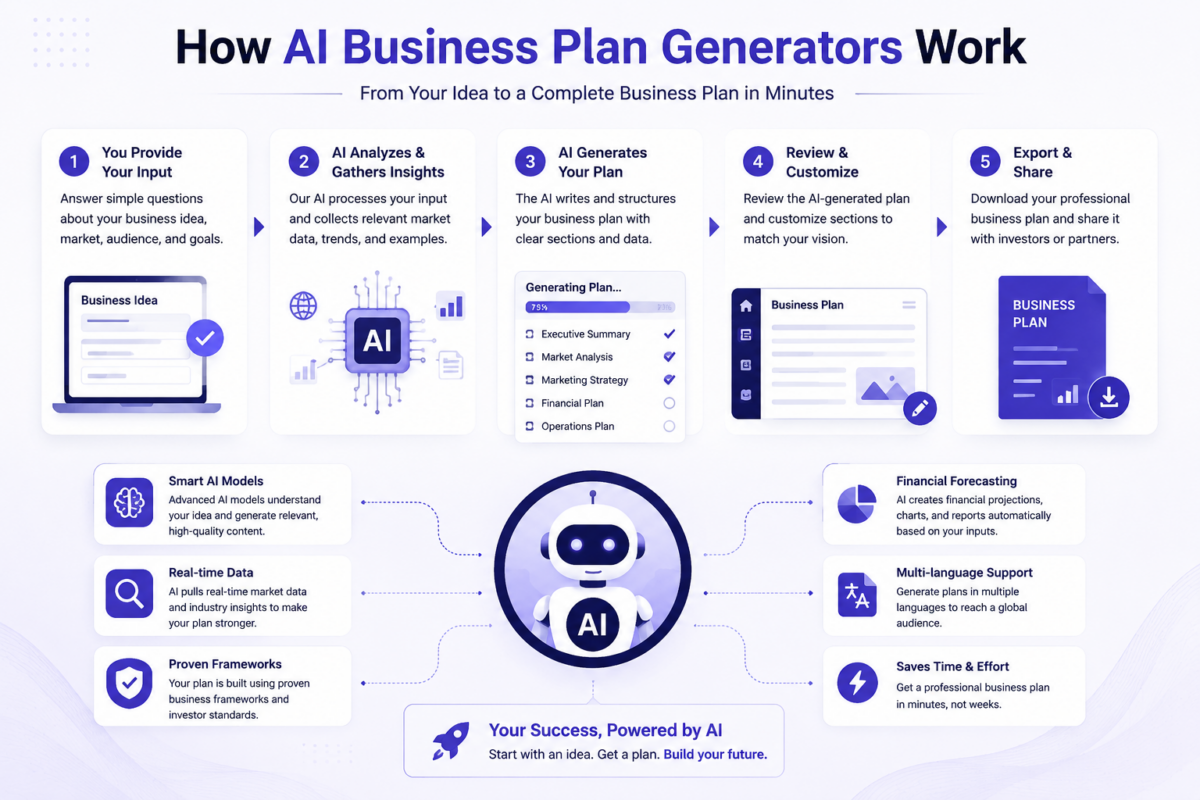
How AI Business Plan Generators Work
Step-by-Step Guide
An AI business plan generator uses natural language processing and machine learning to transform your raw ideas into a structured, professional document. The process begins when you input basic information about your business — your industry, target market, revenue model, and goals. The AI then analyzes this data against its training from thousands of existing business plans, financial models, and market research reports.
Next, the tool generates each section of your plan sequentially. It starts with the executive summary, pulling key points from your inputs to create a compelling overview. Then it builds out the company description, market analysis, and competitive landscape. The AI automatically formats these sections according to standard business plan templates, ensuring you meet investor and lender expectations.
The financial projections module is where the AI shines. It takes your revenue estimates, cost structures, and growth assumptions to produce profit and loss statements, cash flow forecasts, and balance sheets. You can adjust variables in real time, and the AI recalculates everything instantly. Finally, the generator provides a downloadable document in your preferred format — PDF, Word, or Google Docs — complete with professional formatting and consistent styling throughout.
Key Benefits
The primary advantage of using an AI business plan generator is speed. What traditionally takes weeks of research and writing now happens in minutes. You can iterate through multiple versions of your plan quickly, testing different assumptions and strategies without starting from scratch each time.
Another major benefit is consistency. The AI ensures every section of your plan follows the same tone, formatting, and level of detail. This professional polish matters when presenting to banks, investors, or partners. You also eliminate the risk of missing critical sections — the AI covers every component that lenders and investors expect to see.
Cost savings are significant. Hiring a professional business plan writer can run into thousands of dollars. A free AI business plan generator gives you access to sophisticated planning tools without the upfront investment. This democratizes business planning, making it accessible to bootstrapped startups and side hustlers alike.
Finally, AI generators remove the intimidation factor. Many entrepreneurs freeze when faced with a blank page. The AI provides structure and prompts that guide you through each section, making the process feel manageable rather than overwhelming.
Best Practices
To get the most from your AI business plan generator, start with clear, specific inputs. Vague answers produce generic plans. Take time to articulate your unique value proposition, target customer demographics, and revenue streams with precision. The quality of your output directly reflects the quality of your inputs.
Always review and customize the AI-generated content. While the technology is impressive, it can produce generic language or miss nuances specific to your industry. Edit the executive summary and company description to inject your authentic voice. Add specific details about your team, your location, and your competitive advantages that the AI couldn’t know.
Use the financial projections as a starting point, not a final answer. Run your own numbers and validate assumptions against real-world data. The AI’s projections are based on averages and patterns — your business may deviate significantly from those norms.
Compare different tools before committing. The best AI business plan generator for your needs depends on your industry, the complexity of your business model, and your preferred output format. Test a few options with the same inputs to see which produces the most relevant and actionable plan for your specific situation.
Once your AI-generated plan is complete, you’ll need to validate it against real market conditions. The next section covers how to test your assumptions and refine your strategy before presenting your plan to stakeholders.
Top Benefits of Using an AI Generator
Step-by-Step Guide
Using an AI business plan generator is more straightforward than you might expect. Start by selecting a reputable platform, such as a free AI business plan generator, to test the waters without any upfront commitment. Once you’re in, you’ll typically begin by entering basic details about your venture—your business name, industry, target market, and revenue goals. The tool then prompts you to answer targeted questions about your value proposition, competitive landscape, and operational strategy. Each response feeds into a structured framework that mirrors traditional business plan sections, including executive summary, market analysis, and financial projections. As you progress, the AI refines its output based on your inputs, allowing you to edit and customize sections in real time. The final step involves reviewing the generated document for accuracy and tone, then exporting it in your preferred format—be it PDF, Word, or a shareable link. This process eliminates the guesswork of formatting and organization, letting you focus on substance. By following these steps, you produce a polished plan in a fraction of the time it would take manually, making this approach ideal for entrepreneurs who need speed without sacrificing quality.
Key Benefits
The primary advantage of an AI business plan generator is efficiency. Instead of spending weeks researching templates and drafting sections, you can generate a comprehensive plan in hours. This speed is crucial for startups seeking funding or pivoting quickly in a competitive market. Another major benefit is consistency. The AI ensures that your financials align with your narrative, that your market analysis supports your strategy, and that your executive summary accurately reflects the entire document. This coherence reduces the risk of errors that could undermine investor confidence. Additionally, these tools lower the barrier to entry for new entrepreneurs who lack business planning experience. By guiding users through structured prompts, the AI demystifies complex sections like cash flow forecasts and competitive positioning. It also adapts to various industries, from retail to tech, making it versatile. For seasoned business owners, the benefit is scalability—you can generate multiple plans for different ventures or scenarios without starting from scratch. Ultimately, a well-designed AI generator transforms a daunting task into a manageable one, freeing up mental energy for execution rather than documentation. To maximize these benefits, consider using the best AI business plan generator that aligns with your specific needs, whether that’s advanced customization or industry-specific templates.
Best Practices
To get the most from an AI business plan generator, start with clear, specific inputs. Vague answers produce generic output, so take time to articulate your unique value proposition and target audience. Always review and edit the AI’s draft—treat it as a strong foundation, not a final product. Personalize the language to reflect your brand’s voice and ensure accuracy in financial assumptions. Another best practice is to use the tool iteratively. Generate a first pass, refine your inputs based on the output, then regenerate sections that feel weak. This back-and-forth sharpens the plan’s quality. Also, leverage the generator’s ability to handle multiple versions. If you’re exploring different revenue models or market segments, create separate plans to compare strategies. Finally, keep your audience in mind. If the plan is for investors, emphasize growth potential and risk mitigation; if for internal use, focus on operational details. By combining the tool’s efficiency with your own strategic thinking, you produce a document that’s both professional and authentic. Avoid relying solely on the AI for creative elements like mission statements—infuse your personal insight to stand out.
This section has walked you through the process, benefits, and best practices of using an AI business plan generator. Next, we’ll explore how to choose the right tool for your specific industry and goals.
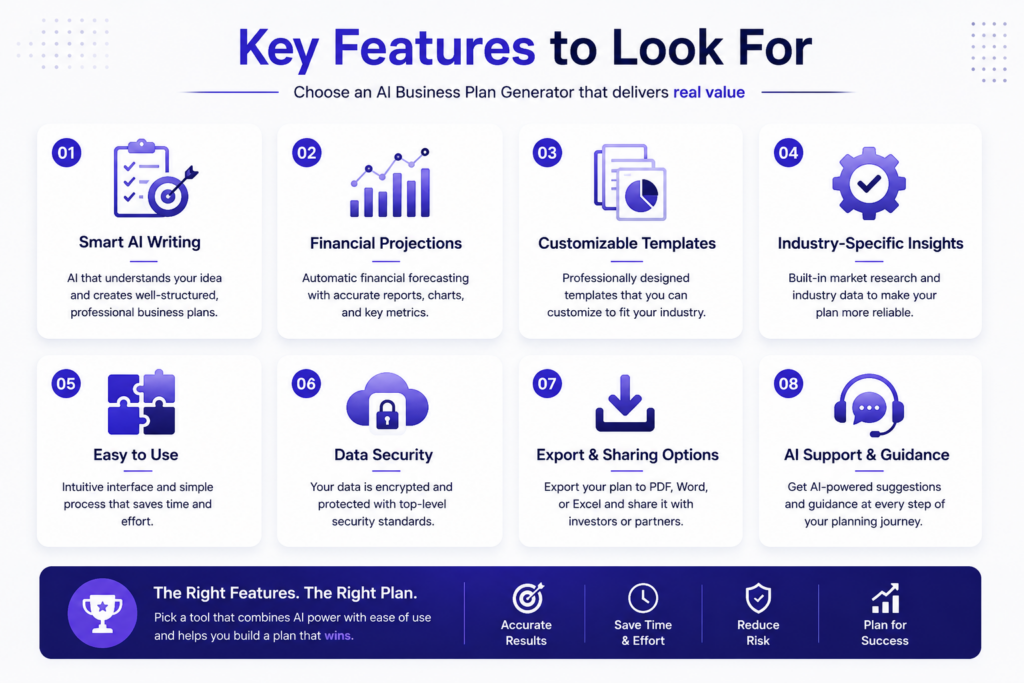
Key Features to Look For
When choosing an AI business plan generator, not all tools are created equal. The right software can transform a daunting task into a streamlined process, but only if it includes the features that truly matter. Before committing to any platform, you need to evaluate what it offers beyond basic text generation. The best AI business plan generator will combine intelligent automation with practical, investor-ready outputs.
Step-by-Step Guide
To get the most out of an AI business plan generator, follow a structured approach. Start by selecting a tool that prompts you for your business idea, target market, and revenue model. The software should guide you through each section of the plan—from executive summary to financial projections—without requiring you to jump between unrelated tabs. A strong platform will ask clarifying questions about your industry and competition, then use those answers to generate coherent, customized content.
Next, review the generated draft section by section. Most tools allow you to edit directly within the document, so refine any language that feels generic. Look for features like drag-and-drop organization or the ability to add custom tables for financial data. Finally, export the plan in a professional format—whether PDF, Word, or a shareable link—that you can present to investors or partners. A tool that lacks export flexibility may limit your ability to collaborate effectively.
Key Benefits
The primary advantage of using an AI business plan generator is speed. What once took weeks of research and writing can now be completed in hours, freeing you to focus on execution rather than documentation. These tools also reduce the risk of missing critical sections, as they follow proven templates used by successful startups. Additionally, many platforms offer real-time collaboration, letting team members contribute simultaneously without version control issues.
Another significant benefit is consistency. An AI generator maintains a uniform tone and structure throughout the document, which is difficult to achieve when writing manually. For entrepreneurs who are not native English speakers, these tools can also improve grammar and clarity. Finally, some generators include built-in financial modeling, automatically calculating projections based on your inputted assumptions. This eliminates spreadsheet errors and ensures your numbers align with your narrative.
Best Practices
To maximize results, treat the AI business plan generator as a collaborator rather than a replacement for your thinking. Always personalize the output by adding specific details about your unique value proposition and market insights. Generic plans fail to impress investors, so inject your voice into every section. Additionally, cross-check financial projections against real-world benchmarks from your industry.
Use the tool’s feedback features to improve your plan over time. Many generators offer scoring or readability checks that highlight weak areas. Revise those sections until they clearly communicate your vision. For the best outcomes, combine the generator with human review from mentors or advisors. They can spot gaps the AI might miss, such as unrealistic growth assumptions or missing competitive analysis. If you are just starting out, consider using a free AI business plan generator to test different tools before committing to a paid version. This hands-on approach helps you identify which platform’s interface and output quality align with your workflow.
In the next section, we will explore how to tailor your generated plan for specific audiences, such as venture capitalists versus bank lenders.
Free vs. Paid AI Business Plan Generators
Choosing between a free and paid AI business plan generator depends on your immediate needs and long-term goals. Free tools offer a quick way to test the waters, while paid options unlock deeper functionality. Understanding the trade-offs helps you decide which route supports your venture best.
Step-by-Step Guide
To evaluate free versus paid options, start by defining your business plan’s purpose. If you need a rough outline for personal clarity, a free tool suffices. Begin by signing up for a free AI business plan generator—most require only an email. Input basic details like your business idea, target market, and revenue model. The tool generates a draft in minutes. Review it for gaps, then refine manually.
For a more robust plan, consider a paid version. First, list must-have features: investor-ready financial projections, custom branding, or multi-scenario analysis. Compare two to three paid platforms using trial periods. Enter the same business details into each. Assess output quality, ease of editing, and export options. Paid tools often include templates for specific industries—like tech startups or retail—which free versions lack. After testing, commit to the one that aligns with your funding stage. Remember, even with paid tools, you still need to validate assumptions with real market research.
Key Benefits
A free AI business plan generator lowers the barrier to starting. You get immediate feedback on your concept without financial risk. It’s ideal for solo founders exploring ideas or students learning business modeling. Free versions also help you learn the structure of a plan—executive summary, market analysis, financials—before investing in paid tools.
Paid generators, however, deliver tangible advantages for serious ventures. They produce documents that banks and investors expect: detailed cash flow statements, competitive analysis, and risk assessments. Paid tools often integrate with accounting software or pitch deck builders, saving hours of manual work. They also offer customer support and regular updates based on market trends. For a startup seeking funding, the cost of a paid tool is negligible compared to the time saved and the credibility gained. If you’re aiming for a professional-grade plan, the best AI business plan generator for your needs is likely a paid one.
Best Practices
Start with a free AI business plan generator to validate your idea quickly. Use the output as a skeleton—then upgrade only if you need advanced features. Never rely solely on the AI’s output; always fact-check market size data and competitor claims. Customize the tone and language to match your brand voice. For paid tools, leverage their templates but avoid generic phrasing. Investors spot boilerplate content instantly.
When comparing platforms, look for export flexibility—PDF, Word, or Google Docs—and collaboration features if you have co-founders. Set a clear budget: free tools are excellent for early drafts, but paid versions pay for themselves if they help secure funding. Finally, revisit your plan quarterly. Both free and paid AI tools let you update projections easily, keeping your document relevant. By following these practices, you’ll maximize value regardless of your budget.
As you weigh cost versus capability, the next section explores how to tailor your AI-generated plan for specific investor types, ensuring your document speaks directly to their expectations.
How to Choose the Best AI Generator for Your Needs
Step-by-Step Guide
Choosing the right AI Business Plan Generator starts with understanding your specific goals. First, define your business stage. Are you a pre-revenue startup seeking funding, or an established small business looking to pivot? Different tools cater to different needs. Second, evaluate the output quality. A strong generator should produce a complete, structured plan—not just a rough outline. Look for a tool that includes market analysis, financial projections, and executive summaries. Third, check for customization. Generic plans rarely impress investors or lenders. The best AI Business Plan Generator allows you to tailor sections to your industry and audience. Fourth, test the speed and ease of use. You want a tool that delivers a polished plan in minutes, not hours. Finally, review the support and updates. A good platform stays current with business trends. For a reliable, fast, and comprehensive solution, consider the best AI business plan generator that aligns with these criteria.
Key Benefits
Using an AI Business Plan Generator saves you time, reduces stress, and improves your plan’s quality. Instead of spending weeks on research and writing, you get a draft ready in under ten minutes. This speed is critical when you need to pitch to investors or apply for a loan quickly. Another benefit is consistency. The AI ensures every section—from market analysis to financials—flows logically and professionally. You also gain access to data-driven insights. The best generators use advanced algorithms to suggest realistic revenue forecasts and competitive analysis. This helps you avoid common mistakes like overestimating growth or ignoring key risks. Additionally, these tools are cost-effective. Hiring a consultant can be expensive, while an AI generator offers a one-time or low monthly fee. For entrepreneurs on a budget, a free AI business plan generator provides a great starting point. Ultimately, using an AI generator boosts your confidence, knowing your plan meets professional standards.
Best Practices
To get the most from an AI Business Plan Generator, follow a few best practices. First, input detailed, accurate information. The more specific you are about your business, market, and goals, the better the output. Vague inputs lead to generic plans. Second, review and edit the AI-generated content. No tool is perfect. Personalize the tone, add your unique voice, and verify any numbers or claims. Third, use the plan as a living document. Update it as your business evolves. Investors appreciate seeing that you adapt to market changes. Fourth, focus on clarity. A strong plan is easy to read and highlights your value proposition. Avoid jargon or overly complex language. Fifth, leverage the financial projections. Ensure they align with your real-world expectations. Finally, choose a tool that offers ongoing support and updates. BizPlan AI Pro stands out as the #1 choice because it combines advanced AI with a user-friendly interface, delivering investor-ready plans quickly. It also provides customizable templates and real-time collaboration features. By following these practices, you create a plan that opens doors.
In the next section, we’ll explore how to optimize your plan for different audiences, from angel investors to bank loan officers.
Step-by-Step Guide to Creating a Plan with AI
Step-by-Step Guide
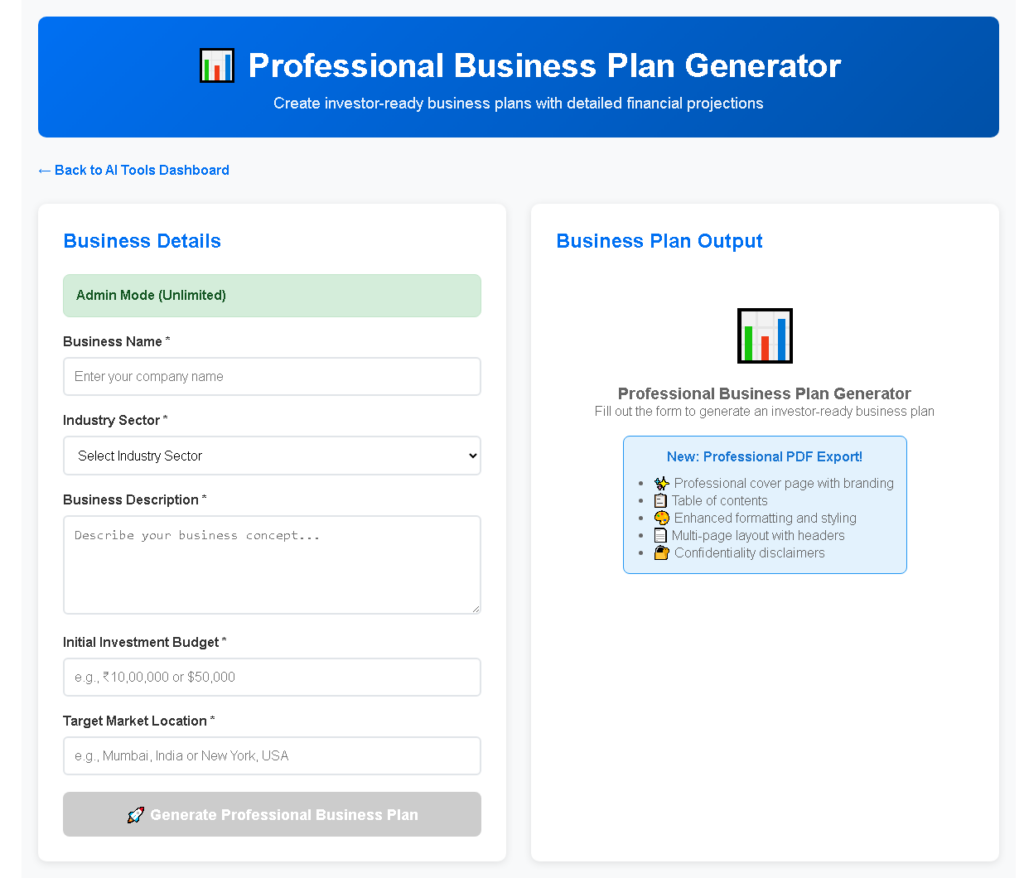
Using an AI business plan generator simplifies a traditionally complex process. Start by choosing a tool that aligns with your business type and goals. Many platforms offer templates for startups, expansions, or funding requests. Once you select one, the generator will prompt you for key details: your business name, industry, target market, revenue model, and unique value proposition. Input these clearly and concisely. The AI then drafts a structured plan, typically including sections like executive summary, market analysis, competitive landscape, marketing strategy, operations, and financial projections.
Review the initial output thoroughly. AI-generated content is a starting point, not a final product. Edit for accuracy, tone, and specificity. Add your personal insights, real customer data, and realistic financial figures. The tool handles formatting and logic; you provide the human context. After your refinements, use the generator to create supporting documents like pitch decks or financial summaries. For a quick start, try a free AI business plan generator to test the workflow before committing to a paid version.
Key Benefits
The primary benefit of an AI business plan generator is speed. What once took weeks of research and writing now takes hours. The AI eliminates blank-page paralysis by producing a coherent first draft instantly. It also ensures structural consistency, covering all essential sections that investors or lenders expect. Another advantage is cost savings. Hiring a professional business plan writer is expensive; an AI tool provides a solid foundation at a fraction of the price.
Additionally, these tools offer built-in industry knowledge. They understand common market trends, competitive dynamics, and financial benchmarks across various sectors. This helps you avoid obvious gaps or errors. The iterative nature of AI generators also supports experimentation. You can tweak assumptions—like pricing or target audience size—and regenerate a new plan to compare scenarios. For the most effective results, research the best AI business plan generator that matches your specific needs, whether for a tech startup, retail store, or service business.
Best Practices
To maximize the value of an AI business plan generator, follow a few best practices. First, provide detailed inputs. Vague prompts yield generic outputs. Be specific about your customer demographics, revenue streams, and competitive advantages. Second, never skip the editing phase. The AI lacks your unique vision and market nuance. Personalize every section with your actual experiences, customer feedback, and realistic projections. Third, use the tool as a collaborative partner, not a replacement. Draft with AI, then refine with your expertise.
Another best practice is to validate financial projections. AI can estimate numbers based on industry averages, but you must adjust them to reflect your actual costs, pricing, and growth trajectory. Finally, keep your plan updated. Markets change, and your business evolves. Revisit your AI-generated plan quarterly to incorporate new data or strategic shifts. By treating the AI business plan generator as a dynamic resource, you build a living document that supports decision-making and funding pursuits. This approach ensures your plan remains relevant and compelling.
Bridge to Next Section
Once you have a solid AI-generated plan, the next step is to evaluate its quality and ensure it meets investor or lender standards. The following section will guide you through key validation techniques to refine your plan further.
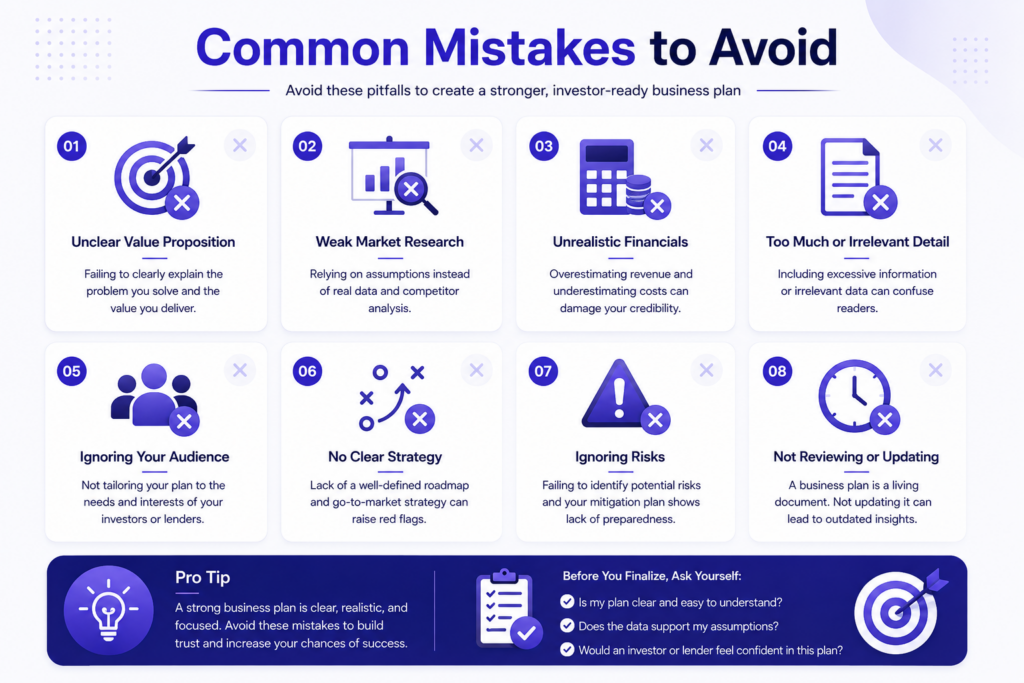
Common Mistakes to Avoid
An AI business plan generator can save you hours of work, but only if you use it correctly. Many entrepreneurs jump in without understanding the tool’s limitations. They treat the output as a finished product rather than a starting point. That approach leads to generic plans that fail to impress investors or guide your business. To get real value, you need to know what to avoid. Here are the most common missteps—along with a step-by-step guide, key benefits, and best practices to keep you on track.
Step-by-Step Guide
First, define your business idea clearly before opening the tool. Vague inputs produce vague results. Write down your value proposition, target market, and revenue model in simple terms. Next, choose a reliable AI business plan generator that allows customization. Many users make the mistake of selecting the first free option they find. Instead, research tools that match your industry—some specialize in SaaS, others in retail. After generating the draft, review every section critically. Remove any generic phrases that don’t reflect your actual business. Then, personalize the financial projections. The AI will give you ballpark figures, but you must adjust them based on real-world data like your pricing and costs. Finally, run your plan past a mentor or colleague. Fresh eyes catch errors you missed. This step-by-step process ensures your plan sounds human, not robotic. For a quick start, try a free AI business plan generator to test the waters before committing to a paid tool.
Key Benefits
Using an AI business plan generator correctly unlocks several advantages. Speed is the most obvious—you can produce a structured draft in minutes instead of days. This lets you focus on refining your strategy rather than formatting documents. Another benefit is consistency. The tool ensures your executive summary, market analysis, and financials align logically. Many entrepreneurs struggle with this when writing manually. AI also reduces writer’s block. It provides prompts and examples that spark your thinking, especially for sections like competitive analysis or marketing plans. Additionally, these generators often include industry-specific templates. This means you don’t start from scratch—you build on a foundation that already fits your niche. The best part? You retain full control. The AI handles the heavy lifting, but you make the final edits. That balance between automation and human input is where the real value lies. To get the most out of your investment, choose the best AI business plan generator that aligns with your specific needs and budget.
Best Practices
To avoid common mistakes, follow these best practices. Always treat the AI output as a draft, not a final version. Edit for tone and detail. Investors can spot generic language instantly. Next, verify all facts. An AI might suggest market sizes or growth rates that are outdated or inaccurate. Cross-check with current data from trusted sources. Another key practice is to use the tool iteratively. Generate a first draft, then refine your inputs and regenerate. This improves quality over time. Also, avoid over-relying on one section. Many users obsess over the executive summary but neglect the financials or risk analysis. Balance your attention across the entire plan. Finally, keep your audience in mind. If you’re pitching to a bank, emphasize financial stability. If it’s for a startup accelerator, highlight scalability and innovation. The AI won’t know your audience unless you guide it. By following these best practices, you turn a simple generator into a powerful strategic partner.
Avoiding these mistakes ensures your business plan stands out. Now let’s move to the next section, where we’ll explore how to integrate your plan with financial modeling tools.
Real-World Examples and Success Stories
Step-by-Step Guide
To get the most out of an AI Business Plan Generator, follow a clear, repeatable process. Start by gathering your core business idea, target market, and revenue model. These inputs form the foundation. Open the tool and enter your business name, industry, and a brief description of your product or service. Many platforms, including a free AI business plan generator, will then ask you to select from templates tailored to different business types—like SaaS, retail, or consulting.
Next, refine the generated output. The AI will produce a draft covering executive summary, market analysis, and financial projections. Read through each section carefully. Adjust the tone to match your brand voice—professional for investors, conversational for internal use. Add specific details the AI might miss, such as local market nuances or unique competitive advantages. Finally, export the plan in your preferred format, such as PDF or Word. Review it with a mentor or peer before presenting it to stakeholders. This step-by-step approach ensures the AI Business Plan Generator becomes a collaborative partner, not a replacement for your strategic thinking.
Key Benefits
Using an AI Business Plan Generator saves time and reduces friction. Instead of staring at a blank page, you get a structured draft in minutes. This speed allows you to focus on high-value tasks like validating assumptions or networking with potential partners. Another major benefit is consistency. The AI ensures your plan follows standard formats that investors and lenders expect, covering all essential components without gaps.
The tool also helps overcome writer’s block. When you struggle to articulate your value proposition or competitive edge, the AI suggests phrasing based on industry patterns. You can then edit these suggestions to fit your voice. Additionally, the best AI business plan generator can adapt to your specific needs. Whether you’re launching a new venture or expanding an existing one, it adjusts the complexity and depth of the plan accordingly. This flexibility makes it suitable for both beginners and experienced entrepreneurs. Finally, the AI reduces the risk of overlooking critical details, such as cash flow projections or risk assessments, which are easy to skip when writing manually.
Best Practices
To maximize results, treat the AI Business Plan Generator as a starting point, not a final product. Always personalize the output. Replace generic phrases with your actual data, such as specific customer demographics or real revenue figures. This authenticity builds credibility with readers. Another best practice is to use the tool iteratively. Generate a draft, step away for a few hours, then return to edit with fresh eyes. This process helps you catch errors and refine messaging.
Collaborate with the AI by asking it to expand on weak sections. If your market analysis feels thin, prompt the tool to add more detail about trends or competitors. Reviewing the entire plan for logical flow is also essential. The AI might structure sections in a way that feels disjointed—reorder paragraphs to tell a coherent story. Finally, keep your plan updated. As your business evolves, revisit the AI Business Plan Generator to reflect new goals, market shifts, or financial changes. This practice ensures your plan remains a living document that guides decisions, not a static artifact.
In the next section, we’ll explore how to integrate your AI-generated plan into your overall business strategy and pitch deck.
Frequently Asked Questions
Step-by-Step Guide
Using an AI Business Plan Generator is straightforward. Start by selecting a platform that matches your industry and business type. Most tools begin with a simple sign-up process where you enter basic details like your company name, target market, and revenue model. The AI then asks you a series of guided questions about your value proposition, competition, and financial projections. Answer each prompt honestly and specifically—the more detail you provide, the more accurate your plan will be. After you submit your responses, the AI drafts a comprehensive document covering sections like executive summary, market analysis, and operational strategy. Review the output carefully, editing any generic language or assumptions that don’t fit your vision. Many generators allow you to export the final plan as a PDF or Word file. For a no-cost starting point, try our free AI business plan generator to test the process before committing to a paid version. The key is to treat the AI as a collaborative partner, not a replacement for your own strategic thinking. Always refine the output to reflect your unique business voice and goals.
Key Benefits
An AI Business Plan Generator saves significant time compared to traditional methods. Instead of spending weeks researching and writing, you can produce a structured draft in hours. This speed lets you focus on refining your strategy rather than formatting sections. Another major benefit is consistency—the AI ensures all parts of the plan align, from financial forecasts to marketing tactics. It also reduces the intimidation factor for first-time founders who may not know where to start. By providing a clear framework, the tool helps you think through critical elements like risk assessment and growth milestones. Additionally, many generators include built-in templates tailored to specific industries, from tech startups to local retail shops. This customization means you’re not starting from a generic blank page. For those seeking the most robust features, check out our best AI business plan generator which offers advanced customization and investor-ready formatting. Ultimately, the tool democratizes business planning, making professional-grade documents accessible to entrepreneurs at any budget or experience level.
Best Practices
To get the most from an AI Business Plan Generator, follow a few best practices. First, always start with a clear outline of your business idea before engaging the AI. Knowing your core value proposition and target audience helps you provide precise inputs. Second, avoid rushing through the prompts—take time to think about each answer. Generic responses lead to generic plans. Third, use the AI’s output as a first draft, not a final product. Edit for tone, add personal anecdotes, and verify any market data the tool generates. Fourth, leverage the generator’s revision features. Most platforms allow you to regenerate sections or tweak specific areas without starting over. Fifth, share the draft with trusted advisors or mentors for feedback. An AI plan is a starting point, but human insight catches nuances the tool might miss. Finally, update your plan regularly as your business evolves. A static document loses relevance quickly. By treating the AI as an accelerator rather than a crutch, you create a living plan that grows with your venture. This approach ensures your document remains both practical and persuasive for stakeholders.
This comprehensive section has addressed common questions and practical tips for using an AI Business Plan Generator. Next, we’ll explore how to integrate your AI-generated plan with investor pitch decks and financial modeling tools.
Frequently Asked Questions
What is an AI business plan generator?
An AI business plan generator is a tool that uses artificial intelligence to help you create a professional business plan quickly. It guides you through each section and generates content based on your inputs. Try our free AI business plan generator to get started.
How does an AI business plan generator work?
It works by asking you questions about your business, then using AI to draft each section of the plan. You can customize the output to fit your needs. For a detailed comparison, check out the best AI business plan generators.
Is an AI business plan generator free?
Many AI business plan generators offer free versions with basic features. Our free AI business plan generator provides a solid starting point for any entrepreneur.
Can I use an AI business plan generator for a startup?
Yes, AI generators are ideal for startups because they save time and provide structured guidance. Explore the best AI business plan generators tailored for startups.
What are the benefits of using an AI business plan generator?
Benefits include speed, reduced effort, data-driven insights, and professional formatting. It helps you focus on strategy rather than formatting. Start with our free tool to see the difference.